WordPress security for shared hosting

Real WordPress security for sites you don't fully control.

SHIELD-X is a local-first WordPress security plugin built for shared hosting. A bundled WAF with Log / Learning / Enforce modes, file & database scanner with official WordPress.org core/plugin hash compare, TOTP 2FA, hardening, filesystem lockdown, restore points, and DB backups — all running in PHP, no server daemon, no required cloud account.

Get Lifetime License Get Started
SHIELD-X Dashboard
Built for practical WordPress operators: WordPress 6.2+ & PHP 7.4+ GPLv2+ Local-first Tested up to WP 7.0
The problem

Real protection for shared hosting.

Most security plugins assume you own the server. Shared-hosting admins get an .htaccess they can't always touch, no shell, no daemons, and a hosting support team that won't install ModSecurity for you. SHIELD-X is built for that exact world — every protection runs in PHP, every change is previewed, every risky action gets a restore point and a database backup.

1. WAF with three modes

A bundled rule set with log_only, learning, and enforce modes. Per-rule actions, manual lists, plus a temporary block store with expiry.

2. Smart File Scanner

3-stage check. Triggers an Official Core/Plugin Compare by downloading the matching release from WP.org and hashing it.

3. Database Scanner

Scans options, posts, widgets, cron hooks, redirects, and stored scripts. Every remediation action creates a backup first.

4. Vulnerability Scanner

Detects updates and abandoned plugins using the WPVulnerability API (free) or Wordfence Intelligence. Generates virtual patch recommendations.

5. Login Security & Recovery

TOTP 2FA, lockout rules, and an Emergency Recovery URL at /shieldx-recovery that is throttled and session-bound.

6. Hardening & Lockdown

Stealth admin gate, signature removal, SSL enforcement, and Lockdown blocks direct PHP access in critical directories.
WP-CLI

Power-user integration

Manage everything directly from your terminal:

$ wp shield-x status
$ wp shield-x waf mode enforce
$ wp shield-x scan --type=file
$ wp shield-x log rotate
Local

Data stays on the site

Visitor profiler records, WAF logs, scanner findings, backups, restore points, and recovery tokens stay local by default.

Cron

Automated tasks

File, database, vulnerability, backup, and restore-point jobs all run via WP-Cron with safe schedules.

Why professionals choose SHIELD-X

Top 7 reasons why WordPress professionals SHIELD-X

Engineered for technical administrators and developers who demand complete control, robust automation, and shared-hosting compatibility.

01

Full WP-CLI Control

Manage scans, WAF rules, lockouts, database backups, and check security statuses directly from the command line.

02

Vulnerability Intelligence

Integrates natively with the WPVulnerability API and Wordfence Intelligence to inventory components and recommend virtual patches.

03

MU Boot Killswitch

Includes an early-loading MU boot guard with a fatal-error circuit breaker to guarantee your site stays online if things go wrong.

04

Filesystem Lockdown

Prevent unauthorized direct PHP execution and enforce read-only policies on critical paths, fully reversible on demand.

05

Core File Comparison

Automatically downloads official WordPress release archives to accurately verify if core files have been modified or compromised.

06

Built for Shared Hosting

Fails safely. No root access required. Fully functional even when hosts block standard directives or limit permissions.

07

Log, Learn, then Enforce

Never lock yourself out. Our WAF and hardening modules start in learning modes, letting you review traffic before enforcing rules.

System & Admin Experience

Everything you need, visible at a glance.

Setup Assistant

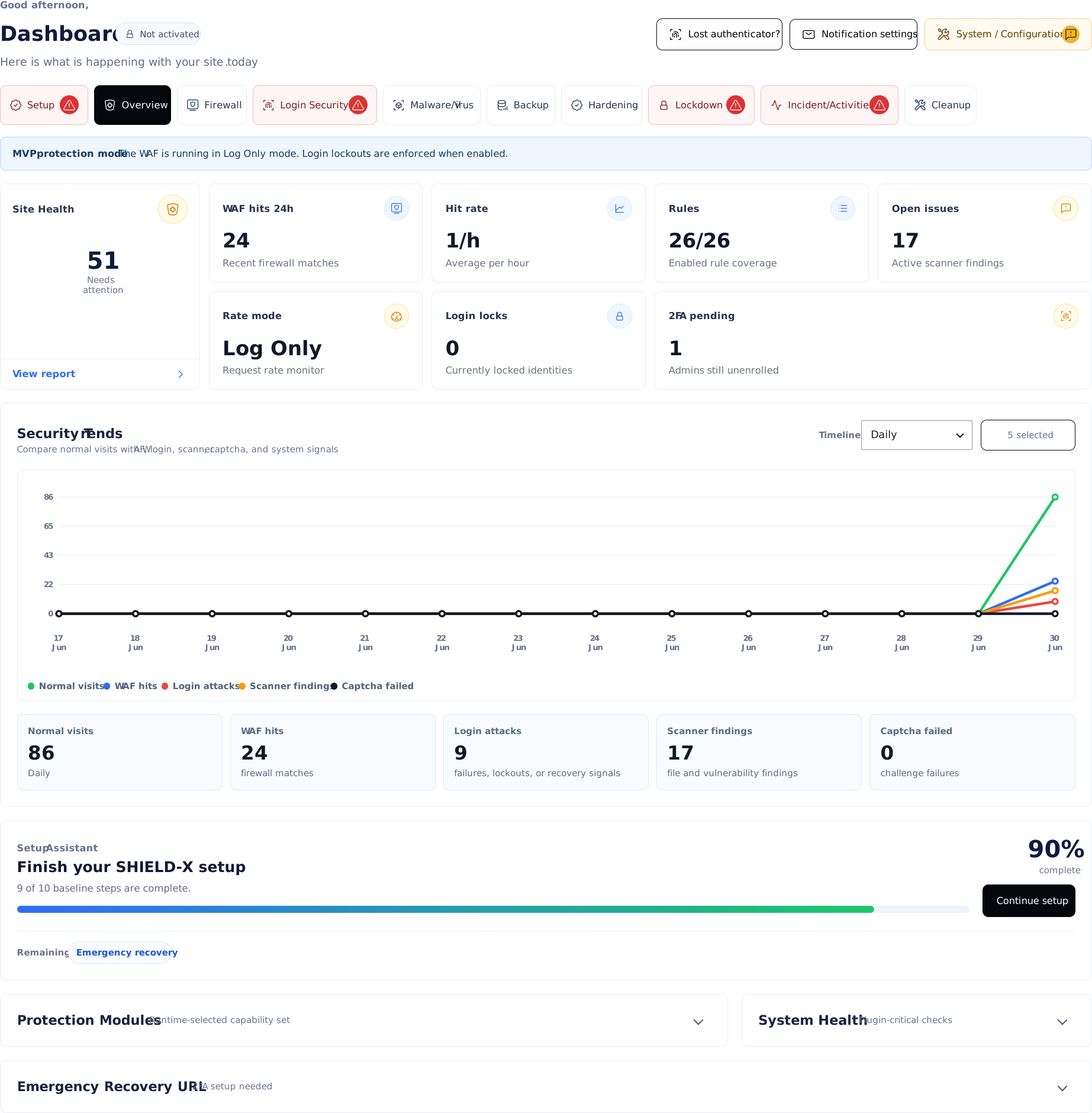
A single hero card shows "X of Y complete" plus a "Last applied" timestamp so you always know which posture your site is in.

Overview Dashboard

A single screen with: readiness score, 24h WAF hits, hit rate, enabled rules, open scanner issues, locked identities, and 2FA-pending admins.

External Cron Support

Jobs can be triggered externally over a signed token endpoint with 60s throttling to guarantee background tasks run.

Backups & Incident Timeline

Scheduled DB backups, restore points, log rotation, and an Incident Timeline recording logins, blocks, and core changes.

System Compatibility

The System page flags missing PHP extensions — OpenSSL, PCRE, JSON, ZipArchive — before you turn on a feature that needs them.

MU Boot Helper

An optional drop-in (`shield-x-boot.php`) that loads before normal plugins, giving you an early killswitch and fatal-error circuit breaker.

Three modes, one screen

Choose the exact operational profile your site needs.

Last applied: Normal Mode at 2026-06-27 09:44:55
Balanced Protection

Normal Mode

Learning firewall, safe hardening, daily scans, and 30-day log rotation.

  • WAF: Learning
  • Scans: Daily
  • Logs: 30 days
  • Lockout: 5 fails / 15m
Strict Daily Operation

Extreme Mode

Strict enforcement, aggressive scanning, shorter log retention, and rapid lockouts.

  • WAF: Enforce (critical)
  • Scans: Twice daily
  • Logs: 14 days
  • Lockout: 3 fails / 30m
Incident Response Posture

Panic Mode

Total lockdown posture. Enforces all rules, scans hourly, and locks out immediately.

  • WAF: Enforce (all)
  • Scans: Hourly
  • Logs: 7 days
  • Lockout: 2 fails / 60m
Who it's for

Built for technical operators.

Shared-hosting site owners

Who can't install a real WAF daemon.

Agencies

Running dozens of WP sites that need a safe, reviewable baseline.

DIY admins

Who want real protection without a SaaS bill.

Incident responders

Who need Panic Mode + an Emergency Recovery URL.

Pricing

Simple, transparent pricing.

Choose the plan that best fits your WordPress security needs.

Annual Plan
$60 / year
  • All security modules
  • 1 site license
  • Local data storage
  • Priority support
Get Started
Best Value
Lifetime License
$300 / lifetime
  • All security modules
  • 1 site license
  • Local data storage
  • Lifetime support & updates
Get Lifetime License
Privacy & Telemetry

No phone home.

We believe security tools should protect data, not collect it. SHIELD-X explicitly avoids telemetry, user tracking, or hidden cloud syncs.

Explicit and opt-in

Any external requests (like vulnerability database lookups) are strictly opt-in and clearly documented.

Wall of Love

Trusted by WordPress professionals.

J
Jacob M.
Lead Developer

"Finally, a security plugin that treats us like adults. The WP-CLI integration alone saves my team hours every week."

S
Sarah L.
Agency Owner

"The ability to preview database remediation SQL before it runs is a game-changer for our high-traffic client sites."

M
Marcus T.
Systems Administrator

"The fact that everything runs locally without a cloud account is exactly what our compliance team needed. Panic Mode is brilliant."

E
Elena R.
Freelance Developer

"I manage 30+ sites on shared hosting. SHIELD-X's scanner gives me the peace of mind that core files haven't been touched."

D
David K.
Security Consultant

"Finally, a tool that doesn't just block blindly. The logging and learning phase makes tuning the WAF completely painless."

Frequently asked questions

Questions before you install?

Do I need a cloud account?
No. Vulnerability feeds are optional and configurable per site; everything else is local.
Does the WAF block traffic out of the box?
No. Default mode is log_only. Move to Learning, review hits, then Enforce.
Can it really run on shared hosting?
Yes — it's PHP-only. Some advanced hardening (filesystem Lockdown, auto_prepend_file) depends on host permissions and is previewed before being applied.
What if a hardening change breaks my site?
Every change is previewed, reversible, and a restore point is attempted first.
Will it conflict with my other plugins?
The plugin whitelist intentionally refuses to whitelist sensitive paths, and a per-request WAF assessment runs first so you're not double-evaluating.
How does the Emergency Recovery work?
A signed token URL is throttled, requires 2FA, binds to IP, and uses a one-time session for the apply step.
What about my visitor data?
The User Profiler is opt-in, sets a first-party cookie, and stores 30 days of metadata locally. Disable it anytime.
Contact Us

Feel free to reach out to us if you need any additional information.